Monday, February 28, 2011

MobileNotifier Beta 3 Adds New Alerts, Lockscreen View, AlertDashboard

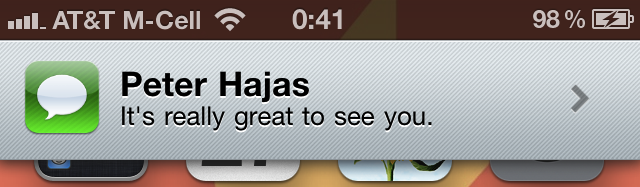
Peter Hajas has announced a new beta of MobileNotifier, an open source notifications manager for iOS.


Probably the biggest feature in this release is the addition of new alerts. These alerts - designed by Kyle Adams - are easy on the eyes, animate cleanly, and show the app icon. They're just like they should be - unobtrusive and user-respecting.


AlertDashboard allows you to view your pending alerts, and either remove them or take action on them. It's really smooth and slick, and I think you're going to love it.

MobileNotifier now has a handy lockscreen view, showing you the number of pending notifications in an unobtrusive way.


MobileNotifier Beta 3 Changelog:
● New alerts
● AlertDashboard
● Lockscreen View
● Full push notification support
● Completely reworked MNAlertManager, considerably more intelligent
● Time encoding support with each alert
● Numerous usability improvements
● Bug fixes relating to 3.x compatibility, alert display and other internal aspects of the utility
● and more! The commit log on GitHub is the best place to see all the iterative changes.


You can get MobileNotifier from the http://phajas.xen.prgmr.com/repo Cydia repository.

Read More

Source: http://iclarified.com/entry/index.php?enid=14077

Tuesday, February 22, 2011

Book Crawler 2.5 For iOS Released

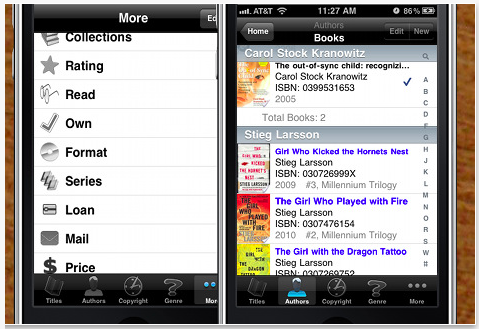
Chiisai App Solutions has released its latest version of the acclaimed Book Crawler book database/catalog app for the iPhone, iPad, and iPod touch. The latest version update adds a second ISBN barcode scanner to Book Crawler's extensive line up of features.


The Book Crawler book database/catalog app describes itself as a powerful, easy to navigate database for the avid reader. With ever-growing capabilities, Book Crawler makes logging, categorizing, searching, and backing up your database both easy and fun. It's a great tool for library professionals, book collectors, and students; and a handy application for everyone else!


The latest feature of Book Crawler adds the useful ZBar ISBN barcode scanner to give users an alternate method of uploading books to their database. Unlike Book Crawler's original barcode scanner, pic2shop, ZBar is fully integrated into the app and does not required a separate download. ZBar is compatible on most iOS platforms, however it will work best for iOS4 and later versions.

Recently featured in the Huffington Post and OCLC WorldCat press releases, Book Crawler is quickly gaining in popularity among its peer applications in the App Store and literary community. Book Crawler has been listed in the "What's Hot" category within the App Store for eight consecutive months, a prestigious head nod from Apple.


"I am so thrilled and excited to be able to produce a book database application that is not only useful to avid readers, but also fun" said Chiisai App Solutions founder and lead developer Jaime Stokes. "I really enjoy working with my customers to provide them with a solution for their book logging needs, and I am really excited for the features that will be released in the next version."


Pricing and Availability:
The full version of Book Crawler 2.5 is $1.99 USD (or equivalent amount in other currencies) and available worldwide exclusively through the App Store in the Books category. The trial version is free.


Read More


Source: http://iclarified.com/entry/index.php?enid=13998

Wednesday, February 16, 2011

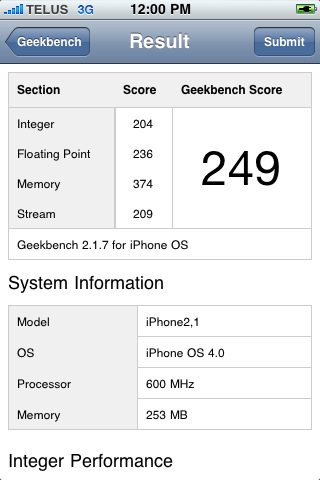
Geekbench 2 App Adds Multi-Core Processor Support

The Geekbench 2 app for iOS has been updated with multi-core processor support.


Geekbench provides a comprehensive set of benchmarks engineered to quickly and accurately measure processor and memory performance. Designed to make benchmarks easy to run and easy to understand, Geekbench takes the guesswork out of producing robust and reliable benchmark results.


What's New In This Version:
- improved processor frequency detection on late-model iOS devices
- added support for multi-core processors


It's unclear why Geekbench has been updated for multi-core as the current iPhone is not. Perhaps they noticed something in their logs...


You can purchase Geekbench 2 from the App Store for $0.99.

Read More [via 9to5Mac]

Source: http://iclarified.com/entry/index.php?enid=13939

Monday, February 14, 2011

Stoned 3D For iPhone

3Dgrafix has announced an update for Stoned 3D for iOS. Stoned 3D 1.0.4 is a fun casual game with amazing graphics and addictive gameplay. Your task is to catch as many falling blocks as possible and to hit the appearing dinosaurs for a good bunch of extra points. You can also upload your scores to OpenFeint to see your position in a worldwide ranking. With its fast and quick gameplay, it is the ideal game for your next coffee break.
This versions brings you:
* The highly requested pause function
* Increased game speed for more arcade feeling
* More sensitive board control
* Compatibility with all iOS devices
"Stoned 3D" is a simple shape matching game that you'll need lightning fast fingers for. Set in a stoneage environment, four Stone Age Men drop stones down on your board and your task is to catch them with the correct "hole"; hitting the appearing dinosaurs will bring a good bunch of extra points.

How to play:

Move the gameboard with your finger to catch the matching blocks. For some extra points try to hit the appearing dinosaurs: The faster the game gets the more points you'll receive. But keep in mind that you only have three lives to catch as many blocks as possible... Missing one means losing a life, so better stay focused and concentrated! When the game is over you can upload your score and see in a worldwide ranking how well you performed.
Pricing and Availability:
Stoned 3D 1.0.4 is $0.99 USD (or equivalent amount in other currencies) and available worldwide exclusively through the App Store in the Games category.
Read More

Source: http://iclarified.com/entry/index.php?enid=13897

Thursday, February 10, 2011

Hipstamatic App Gets Updated to Shoot Rapid-Fire Images

Hipstamatic has been updated with the ability to rapid-fire up to nine images in a row without waiting for processing.

Digital photography never looked so analog. The Hipstamatic brings back the look, feel, unpredictable beauty, and fun of plastic toy cameras of the past! The Hipstamatic keeps the the quirks of shooting old school but gives you the ability to swap lenses, film, and flash settings all with the swipe of a finger.

Features:
• Swap lenses, flashes, and films for hundreds of different effects
• Instantly share your best prints to Facebook, Flickr, and Tumblr
• Enter our monthly photo contests to win amazing prizes
• Order real analog prints delivered to your door, right from the app

Characterized by vignettes, blurring, over saturation, discolored images, Hipstaprints have a casual and seemingly accidental snapshot feel. The Hipstamatic can be downloaded to any iPhone sporting the 3.1 or beyond software update. For $1.99 you can download the base model Hipstamatic which includes a great set of standard lenses, films, and flashes to get started. Additional camera gear is bundled within the app as 'Hipstapaks' and start at 99 cents. Each Hipstapak includes multiple items.

-----------------------------------------------
STANDARD EQUIPMENT (INCLUDED)
-----------------------------------------------
John S lens
Jimmy lens
Kaimal Mark II lens
Ina's 1969 film
Kodot Verichrome film
Blanko film
Standard flash
Dreampop flash

-----------------------------------------------
CURRENT HIPSTAPAKS (available in-app)
-----------------------------------------------
Williamsburg [99¢]
Includes Helga Viking lens, 3 color flash gels, and Pistil film.

The Portland [99¢]
Includes the Lucifer VI lens and BlacKeys film.

Shibuya 渋谷区 [99¢]
Includes the Roboto Glitter lens, Berry Pop flash, and Float film.

Camden [99¢]
Includes Alfred Infrared film and BlacKeys Supergrain film

The Mission [99¢]
Includes Bettie XL lens, Eggshell White camera case, and Ina's 1935 film

What's New In This Version:
● Quicksta Snap film queue system - as you shoot images are processed in the background, enabling you to rapid-fire up to nine images in a row without waiting for processing (requires iOS 4)
● Camera Bag organization system - rearrange and disable lenses, flashes, and films, as well as specifying ones for shake-to-randomize
● Improved HipstaMart, with shiny new FreePak products
● New limited edition FreePak: Fashion FreePak (Chunky Lens and Fashionista Camera Case)
● Other bug fixes and user interface refinements

You can purchase Hipstamatic from the App Store for $1.99.


Source: iClarified
Tuesday, February 8, 2011

Untethered iOS 4.2.1 Jailbreak Tool Released

Although an iOS 4.2.1 jailbreak has been around for a couple months, it came with a catch: if you ever had to reboot your device, you'd have to connect (i.e. tether) it to your computer in order to start using it again.

That's a semi-major inconvenience; if your battery died while you were on the go, you wouldn't be able to use your iPhone, iPod, or iPad again (even if recharged) until you got back to your PC.

Needless to say, people have been itching to get their hands on an "untethered" jailbreak (one that could survive a reboot). The good news: the untethered iOS 4.2.1 jailbreak was just released by GreenPois0n. The bad news: it's Mac-only for the moment, and GreenPois0n's site is currently offline.

Because I'm in the Windows camp, I haven't been able to test the jailbreak myself. And I'm not sure I want to, if only because iOS 4.3 is just around the corner. I will admit I'm eager to get back to using MyWi, the no-monthly-fee hot spot app. But that's pretty much my only motivation for jailbreaking at all.

If you don't want to wait for GreenPois0n to get back online, the jailbreak tool is available via Bittorrent. Keep in mind this is the Mac version; I'm not sure when a Windows version will surface.


As with any such tool, use it at your own risk. In most cases it's fairly easy to "un-jailbreak" a device, to restore it to its original, Apple-sanctioned state, but there's always a chance you could brick your baby.

Want to learn more about all this? Here's a great breakdown of the differences between tethered and untethered jailbreaks.


If you're a Mac user and you're able to snag the tool, hit the comments and let me know how it worked out. For everyone else, let me know your thoughts on the whole jailbreak scene. Worth it? Or not?


Read more: http://reviews.cnet.com/8301-19512_7-20030660-233.html#ixzz1DPdlY7uz